



Most organisations moving to OpenStack run into the same pattern: infrastructure is up, workloads are running, the team is happy with the platform’s flexibility — and then it turns out backup doesn’t work the way anyone expected. The tool that handled VMware perfectly doesn’t see OpenStack. The platform’s native capabilities cover only part of the cases. And choosing the right solution requires an understanding of the architecture that most teams simply don’t have yet. This isn’t a vendor problem. It’s a structural characteristic of OpenStack Backup — and it’s worth understanding before something goes wrong.
Where the Complexity Comes From: Architecture as the Root Cause
VMware has vCenter — a single management plane with a predictable API. Backup vendors know where to connect, what to query, how to capture machine state. It works reliably precisely because the environment is standardised. OpenStack is fundamentally different. It’s not a monolithic platform — it’s an ecosystem of independent services:
- Nova manages the lifecycle of virtual machines
- Cinder handles block storage
- Neutron owns the network layer
- Glance stores images
- Keystone manages identity and access
Each service is versioned independently. Each distribution — Red Hat OpenStack Platform, Canonical, Mirantis, upstream — assembles these components differently, with different versions, different deployment methods, and different storage backend configurations. What’s been validated on one build may need rework on another. For backup, this means one thing: there is no single point of entry. You have to work across the entire stack simultaneously.
What a “Standard” Backup Actually Misses
When people talk about backing up a virtual machine in OpenStack, they often mean just the disk. That’s a fundamental mistake. A virtual machine in OpenStack is not a file or a snapshot. It’s a composition of several independent objects:
- Nova instance holds the compute resource configuration: flavor, metadata, user data, availability zone assignment.
- Ephemeral storage is the boot disk living directly on the hypervisor. A Nova snapshot captures exactly this — and nothing else.
- Cinder volumes are separate block devices attached to the instance. Cinder backup operates on volumes independently of Nova and has no awareness of VM state at the time of the snapshot.
- Neutron configuration — networks, subnets, routers, floating IPs, security groups. None of this lives in Nova or Cinder. When restoring from a standard backup, the entire network topology is gone.
- Security groups and rules are a separate Neutron object that must be recreated manually.
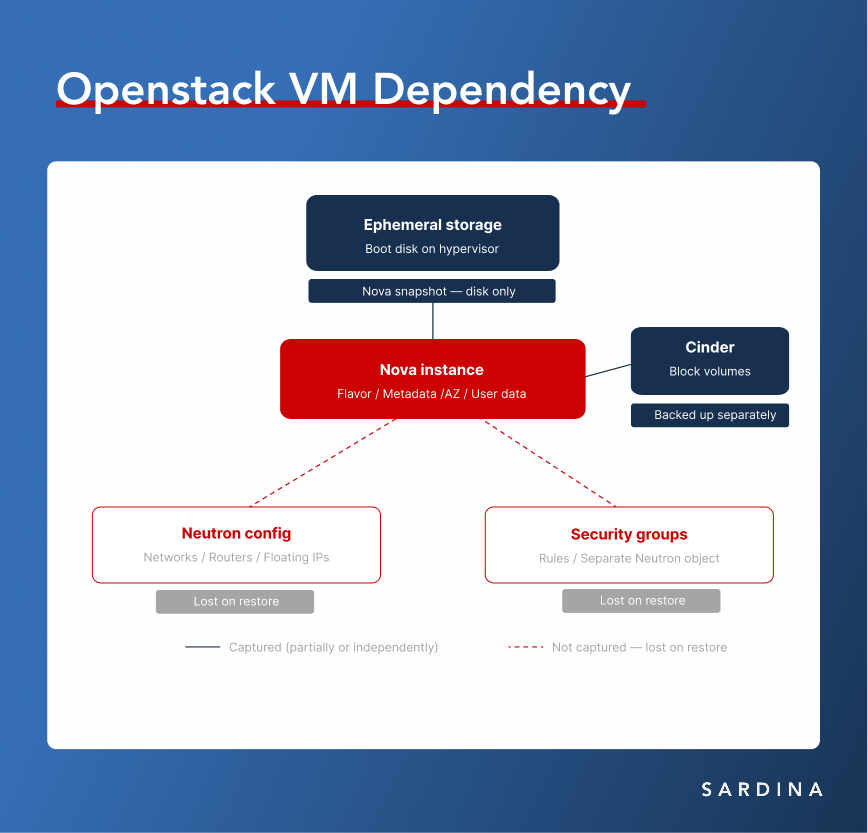
The practical result: restoring a VM from fragmented backups is technically possible. Restoring a working application in its original network environment is a separate operation — one that requires either significant manual effort or a tool that understands the full dependency graph.
Multi-Tenancy: Where Centralised Backup Meets Isolation
OpenStack is almost always deployed as shared infrastructure. Different teams, different projects, different access levels — this is one of the core reasons organisations choose the platform.
But for backup, this adds another layer of complexity. Centralised backup requires access to all resources. Tenant isolation means no one can see another tenant’s data. These two requirements conflict by default — and resolving that conflict has to happen at the backup solution’s architecture level, not through permissions configuration.
A good OpenStack backup solution needs to operate in multiple modes simultaneously: centralised admin-level backup of the entire infrastructure, and self-service backup at the individual project level through Horizon — without crossing isolation boundaries. Most tools not purpose-built for OpenStack can’t do this.
Native Tools: Where They Work and Where They Don’t
OpenStack includes built-in data protection mechanisms. It’s worth being honest about their capabilities — neither underselling nor overstating them.
Cinder backup creates full and incremental backups of block volumes to various backends: Swift, Ceph RBD, NFS, S3-compatible storage. It’s a solid tool for volume-centric data protection. It does not capture Nova metadata, network configuration, or relationships between volumes and instances.
Nova snapshots create instance images stored in Glance. They only work with ephemeral storage. Every snapshot is a full copy — no incremental support. Network configuration is not preserved.
Where native tools are sufficient: dev/test environments with simple topology, single-VM workloads without complex networking, basic DR testing, environments where recovery operations are rare and manual work is acceptable.
Where they fall short: production with multi-tier applications, environments with defined RPO/RTO requirements, multi-tenant infrastructure, any scenario where recovery needs to be reproducible and automated.
What a Proper Solution Looks Like
Native OpenStack backup tools solve the problems described above because they were built for this architecture — not ported from VMware. A proper solution for OpenStack needs to simultaneously:
- Integrate with all relevant APIs (Nova, Cinder, Neutron, Glance, Keystone) and capture the full workload
- Support incremental backups with minimal production impact
- Operate in multi-tenant environments without violating isolation
- Provide centralised management with self-service capability
- Expose a REST API for integration with existing automation workflows
Storware Backup & Recovery is one of the Sardina Systems recommendations that has been validated on FishOS. It supports three backup strategies for different architectures:
Ceph RBD integration — the optimal approach for FishOS environments running on Ceph. Storware communicates directly with Ceph monitors and uses native RBD snapshots for incremental backups. Production impact is minimal; storage efficiency is high because everything happens at the block level.
Disk attachment via Cinder API — a universal strategy independent of storage backend. A Cinder volume is attached to a proxy VM, and the backup is captured through changed block tracking. Works on any OpenStack distribution.
Libvirt — direct hypervisor access over SSH for crash-consistent snapshots of QCOW2/RAW disk files. Requires access to compute nodes but offers maximum flexibility in managing the backup process.
Note: FishOS Ceph works as a validated backup target — not just for Storware, but for other native solutions as well. This is a tested, supported configuration.
OpenStack and Expertise: An Honest Conversation
The complexity of backup in OpenStack is often cited as an argument against the platform. That’s an inaccurate reading. The complexity here is a direct consequence of architectural freedom. OpenStack gives you full control over every layer of the stack: storage backend selection, network architecture, security policies, backup strategy, multi-tenancy. No managed cloud offers this level of control — and that control is precisely why serious infrastructure organisations choose the platform.
The difference between “OpenStack doesn’t work” and “OpenStack works exactly the way we need it to” is almost always a question of expertise. Backup is one of the points where that difference is most visible. A correctly chosen and configured solution covers all the problems described above. An incorrectly chosen one creates an illusion of protection that falls apart at the first real incident.
If you’re building or scaling OpenStack infrastructure and want to sort out your backup strategy before you need it — click here and talk to us.